How to Install and Activate Click to Chat PRO Plugin for WordPress
If you’re looking to add WhatsApp chat to your WordPress website, the Click to Chat PRO Plugin is one of the best tools available. It allows you to connect with your customers directly on WhatsApp, boost engagement, and increase sales.
In this article, we’ll walk you through how to install Click to Chat PRO, activate your license key, and explore some of its powerful display and customization features.
This detailed guide covers every step from installation to activation, including login-based display options, country/language targeting, and z-index customization.
Whether you’re a beginner or a professional WordPress user, by the end of this tutorial, you’ll have your Click to Chat PRO Plugin fully set up and running smoothly on your site.
Table of Contents
🛠️ What is Click to Chat PRO Plugin for WordPress?
The Click to Chat PRO plugin is the premium version of the free Click to Chat plugin developed by HoliThemes.
It helps you add a WhatsApp chat button to your WordPress site with advanced customization, analytics, automation, and display settings.
Unlike the free version, Click to Chat PRO offers advanced features such as:
- Display control based on user login status or country
- Integration with WooCommerce product pages
- Webhooks, analytics tracking, and Google Ads conversions
- Multi-agent and random number support
- Page-level greetings and advanced triggers
The PRO plugin works as an add-on to the main Click to Chat plugin, meaning you must have the free Click to Chat plugin installed and activated first.
💡 Before You Begin
Before installing Click to Chat PRO, make sure you:
- Have the main Click to Chat plugin already installed and active on your WordPress website.
- Have downloaded the Click to Chat PRO ZIP file from your purchase email or account at HoliThemes Shop.
- Have access to your license key (available in your HoliThemes account under Purchase History).
If you purchased this plugin from WPSetup.pro, you’ll receive a genuine license key and official update access for ₹399/year or ₹899 lifetime — both verified and secure.
🚀 Step-by-Step: How to Install Click to Chat PRO Plugin
Follow these steps to install and activate the plugin correctly:
🔹 Step 1: Log in to Your WordPress Dashboard
Go to your WordPress Admin Panel by visiting:yourdomain.com/wp-admin
Enter your admin username and password to log in.
🔹 Step 2: Go to “Plugins” → “Add New”

From the left-hand sidebar, navigate to:
Plugins → Add New
Click on the Upload Plugin button at the top.
🔹 Step 3: Upload the Click to Chat PRO ZIP File
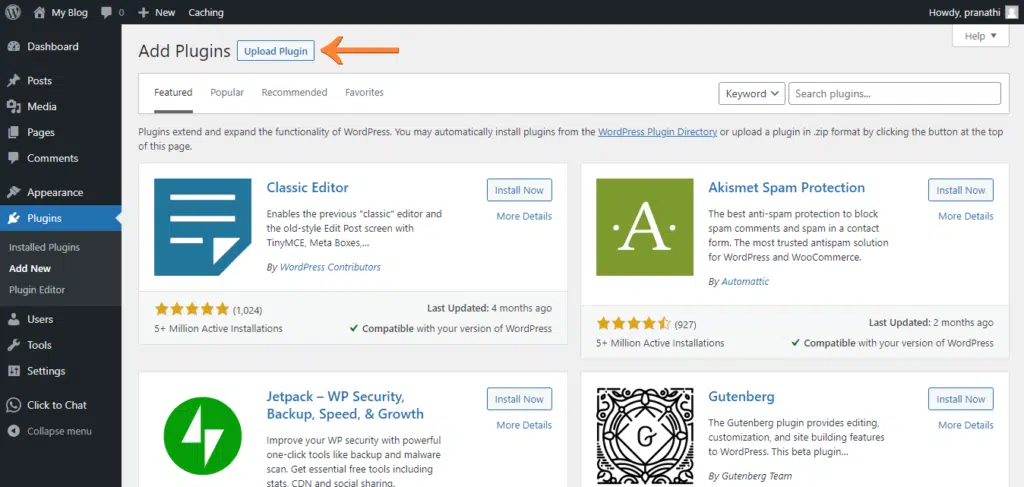
Drag and drop the downloaded click-to-chat-pro.zip file into the upload box
or click on Choose File and select it manually from your computer.
Once uploaded, click on Install Now.
🔹 Step 4: Activate the Plugin
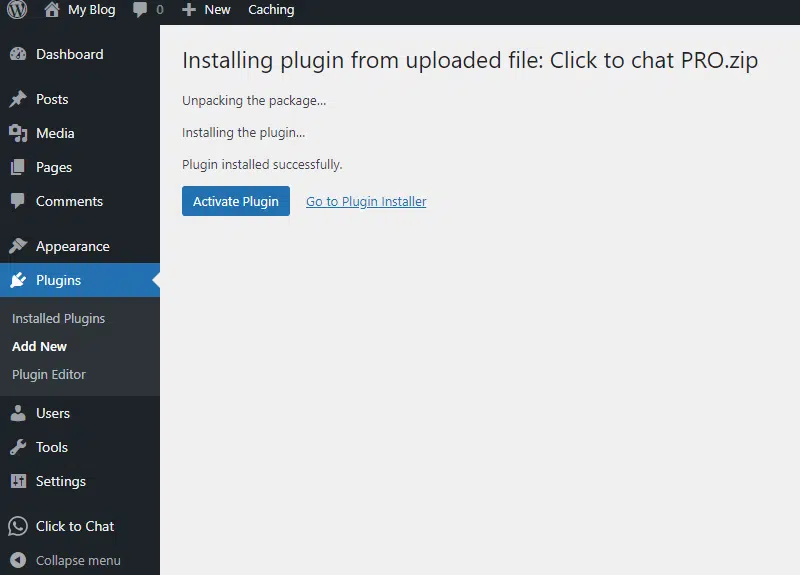
After installation, click on Activate Plugin to activate the Click to Chat PRO add-on.
✅ You should now see both plugins listed in your Plugins page:
- Click to Chat (Main Plugin)
- Click to Chat PRO (Add-on)
Remember: Both are required for the PRO version to work properly.
🔑 How to Activate the Click to Chat PRO License Key
Now that your plugin is installed, the next step is activating your license key to unlock all premium features and receive updates.
Follow these simple steps:
🔹 Step 1: Log in to Your HoliThemes Shop Account
Go to the official HoliThemes Shop website and click on Login.
Use the same email address and password you used during purchase.
If you purchased as a guest, simply create an account using the same email you used during checkout — your order will automatically sync.
🔹 Step 2: Access Purchase History
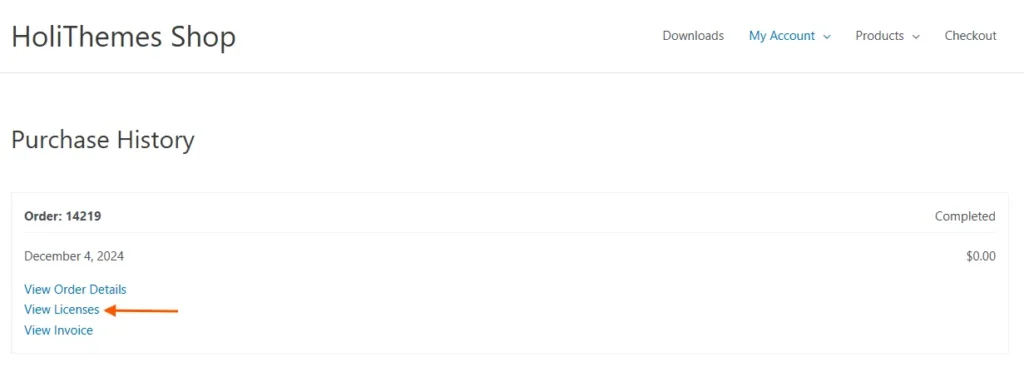
Once logged in, go to My Account → Purchase History.
Here, you’ll see all the products you’ve purchased.
🔹 Step 3: View License Details
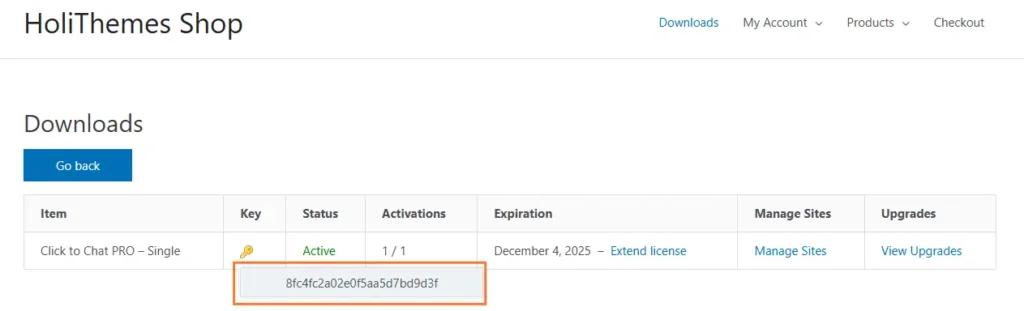
Click on View Licenses next to the Click to Chat PRO plugin.
You’ll see a key icon 🔑 beside the product name — click on it to reveal your License Key.
Copy this key. You’ll need it for activation in WordPress.
🔹 Step 4: Manage License (Optional)
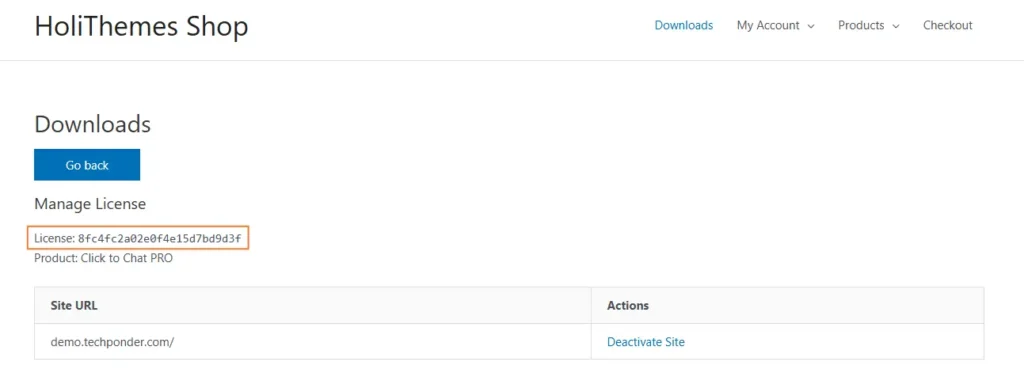
Alternatively, click on Manage Sites in the same table.
You’ll see a list of your activated sites and the license key displayed above the table.
You can copy it from there too.
🔹 Step 5: Activate the License in WordPress
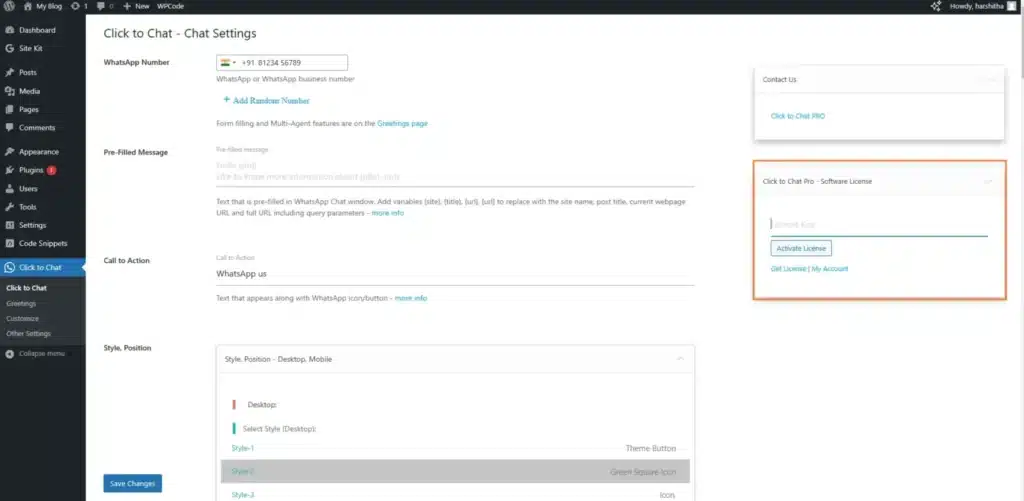
Now go back to your WordPress Admin Dashboard.
Navigate to:
Click to Chat → Click to Chat PRO – Software License
Paste the license key into the input box and click on Activate License.
If activated successfully, you’ll see a confirmation message saying:
✅ “Your license key is active and valid.”
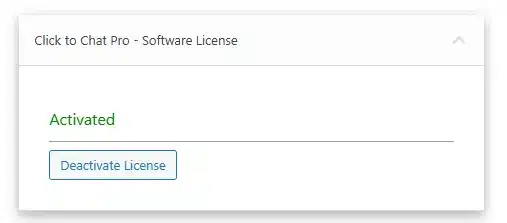
Your Click to Chat PRO plugin is now fully activated and ready to use.
🎥 Watch: How to Install and Configure Click to Chat PRO Plugin
If you prefer learning visually, here’s a quick step-by-step video tutorial showing how to install, activate, and configure the Click to Chat PRO Plugin on your WordPress website.
In this video, you’ll see how to upload the plugin, activate your license key, and adjust display settings like chat position, greetings, and login-based visibility — all in under a few minutes!
⚙️ Display Settings – Based on Visitor Login Status
One of the standout features of Click to Chat PRO is its ability to display the WhatsApp button based on visitor login status.
This feature helps personalize your user experience — for example, showing the chat button only to logged-in users or only to new visitors.
Here’s how to set it up:
🔹 Step 1: Navigate to Display Settings
In your WordPress dashboard, go to:
Click to Chat → Display Settings
Scroll down until you see “Display based on User Login Status.”
🔹 Step 2: Choose Who Sees the WhatsApp Button
You’ll have three options:
- All Users:
The WhatsApp button is visible to everyone — both logged-in and not logged-in users. - Logged-in Users Only:
The WhatsApp button is shown only to users who are logged in.
(Ideal for membership or customer-only areas.) - Logged-out Users Only:
The WhatsApp button appears only for visitors who aren’t logged in.
(Perfect for attracting new leads or first-time visitors.)
These display rules give you precise control over who sees your WhatsApp chat widget, improving both user experience and conversion targeting.
🌍 Additional Display Options in PRO Version
The PRO version extends these display capabilities with several advanced targeting features, including:
- Display Based on Country: Show or hide the chat button for specific countries.
- Display Based on Language: Customize chat visibility for users speaking different languages.
- Schedule Display by Time or Day: Show the WhatsApp chat button only during your business hours.
- Page-Level Customization: Change messages, colors, and triggers on individual pages.
All of these make Click to Chat PRO a complete and flexible WordPress WhatsApp solution.
🎨 How to Modify the z-index Value (Advanced Users)
Sometimes, your WhatsApp icon might appear behind other elements on your website.
This happens because of overlapping layers in web design — controlled by something called the z-index.
The z-index value determines which elements appear “on top” of others.
Here’s how to fix or modify it in the Click to Chat settings:
🔹 Step 1: Navigate to Advanced Settings
Go to:
Click to Chat → Other Settings → Advanced Settings → z-index value
🔹 Step 2: Modify the z-index Value
Change the value to a higher number if your chat icon is hidden behind other content.
Default z-index value: 99999999
Keep it positive. You can increase it slightly if needed, e.g., 100000000.
This ensures your WhatsApp chat button always stays visible above all page elements.
🔒 Best Practices for Using Click to Chat PRO
To make the most of this plugin, keep these tips in mind:
- ✅ Always keep both the main and PRO versions updated.
- 🔐 Use your original license key (avoid nulled or pirated versions).
- 🧩 Configure display settings smartly — don’t overcrowd your site.
- 📊 Connect analytics to measure engagement and conversions.
- 💬 Personalize your greetings for higher response rates.
🧩 Why Buy Click to Chat PRO from WPSetup.pro?
At WPSetup.pro, you don’t just buy a plugin — you buy peace of mind.
We offer 100% genuine WordPress plugins and themes with official license keys and verified updates straight from developers.
Here’s why thousands of WordPress users choose WPSetup.pro:
✅ Original Licensed Plugins – No pirated or nulled scripts.
✅ Affordable Pricing – Just ₹399/year or ₹899 lifetime.
✅ Official Updates – Directly from developers for one year or lifetime.
✅ Full Support – We assist with installation, activation, and setup.
✅ Trust & Security – Your license and site stay fully safe.
When you buy from WPSetup.pro, you get the Click to Chat PRO plugin with a valid license key and genuine updates — ensuring you always stay secure and compatible with the latest WordPress version.
💬 Troubleshooting Common Issues
Here are a few quick fixes for common problems:
1️⃣ License Key Invalid or Expired?
→ Check if you copied it correctly and that your subscription is active.
2️⃣ Button Not Visible?
→ Check Display Settings — it might be restricted to logged-in users or certain countries.
3️⃣ Icon Hidden Behind Content?
→ Increase z-index value in Advanced Settings.
4️⃣ Plugin Not Activating?
→ Ensure the main Click to Chat plugin is installed and active first.
5️⃣ Still Need Help?
→ Contact WPSetup.pro Support via WhatsApp: +91-9332353059
🌟 Conclusion – Get Started with Click to Chat PRO Today!
The Click to Chat PRO Plugin for WordPress is the easiest and most effective way to integrate WhatsApp into your website.
It’s lightweight, fast, and comes packed with smart display options, WooCommerce compatibility, and analytics integration.
With WPSetup.pro’s official license and support, you can install, activate, and customize this plugin within minutes — without any technical hassle.
Whether you’re a freelancer, agency, or eCommerce business owner, this plugin helps you connect instantly with your visitors and turn them into customers.
So don’t wait —
👉 Get Click to Chat PRO Plugin from WPSetup.pro today for just ₹399/year or ₹899 lifetime,
and start chatting with your customers directly on WhatsApp!
❓ Frequently Asked Questions (FAQs)
1. What is the Click to Chat PRO Plugin for WordPress?
The Click to Chat PRO Plugin is a premium WhatsApp chat integration tool for WordPress. It lets you add a WhatsApp button to your site so visitors can message you directly. The PRO version includes advanced features like analytics, WooCommerce support, multi-agent setup, and custom display options.
2. Do I need the free Click to Chat plugin to use the PRO version?
✅ Yes. The PRO plugin works as an add-on to the main Click to Chat plugin. You must have the free version installed and activated first for the PRO plugin to work correctly.
3. How can I install the Click to Chat PRO Plugin?
You can install it from your WordPress dashboard:
1. Go to Plugins → Add New.
2. Click Upload Plugin and upload the Click to Chat PRO ZIP file.
3. Click Install Now, then Activate.
Once activated, it will automatically connect with the main plugin.
4. How do I activate the Click to Chat PRO license key?
After purchase, log in to your HoliThemes Shop account.
Go to Purchase History → View Licenses, copy your license key, then paste it in your WordPress dashboard under:
Click to Chat → Click to Chat PRO – Software License → Activate License.
5. Can I display the WhatsApp button only for logged-in users?
Yes! The PRO version includes display controls that let you show or hide the WhatsApp chat button based on user login status, country, or language. You can set it for All Users, Logged-in only, or Logged-out only visitors.
6. What happens if I don’t activate my license key?
Without activation, the PRO plugin will work temporarily but won’t receive official updates or premium features. Activating your license ensures continuous updates, new features, and priority support.
7. What is the default z-index value in Click to Chat PRO?
The default z-index value is 99999999. It ensures your WhatsApp icon appears above other page elements. Only use positive numbers if you need to modify it for visibility.
8. Is Click to Chat PRO compatible with WooCommerce?
Absolutely ✅. The plugin integrates deeply with WooCommerce, allowing you to display WhatsApp chat buttons on product pages and the shop page — great for increasing sales through instant inquiries.
9. Where can I buy the original Click to Chat PRO Plugin?
You can purchase the genuine, license-verified version of Click to Chat PRO Plugin exclusively from WPSetup.pro. It includes official updates and support at affordable pricing — ₹399/year or ₹899 lifetime.
10. What should I do if I face installation or activation issues?
If you face any problems, contact the WPSetup.pro support team directly via WhatsApp at 📞 +91-9332353059.
Our team will help you with installation, license setup, or troubleshooting within minutes.
💬 Final Tip:
Always use genuine plugins with valid licenses to ensure security, compatibility, and support. The Click to Chat PRO Plugin from WPSetup.pro is 100% authentic and verified — giving you safe access to official updates and features.